Building AI Agents for Smart Prospecting
Designing an autonomous prospecting agent with real-time signal detection built in.
Context & Background
Goava Discover is a B2B sales intelligence platform that helps Nordic companies identify and prioritise high-fit accounts. Sales development reps (SDRs) use it to find, score, and route prospects into their CRM.
AI changed the terms of that job. Competitors started shipping automation, and Goava faced a real choice: evolve the platform toward AI-native workflows, or watch customers evaluate tools that already had.
The answer was a new layer on top of Discover: the Prospecting Agent, an agent that automates account discovery, with a signal-based trigger mode that surfaces real-time buying signals inside the same system.
The Problem
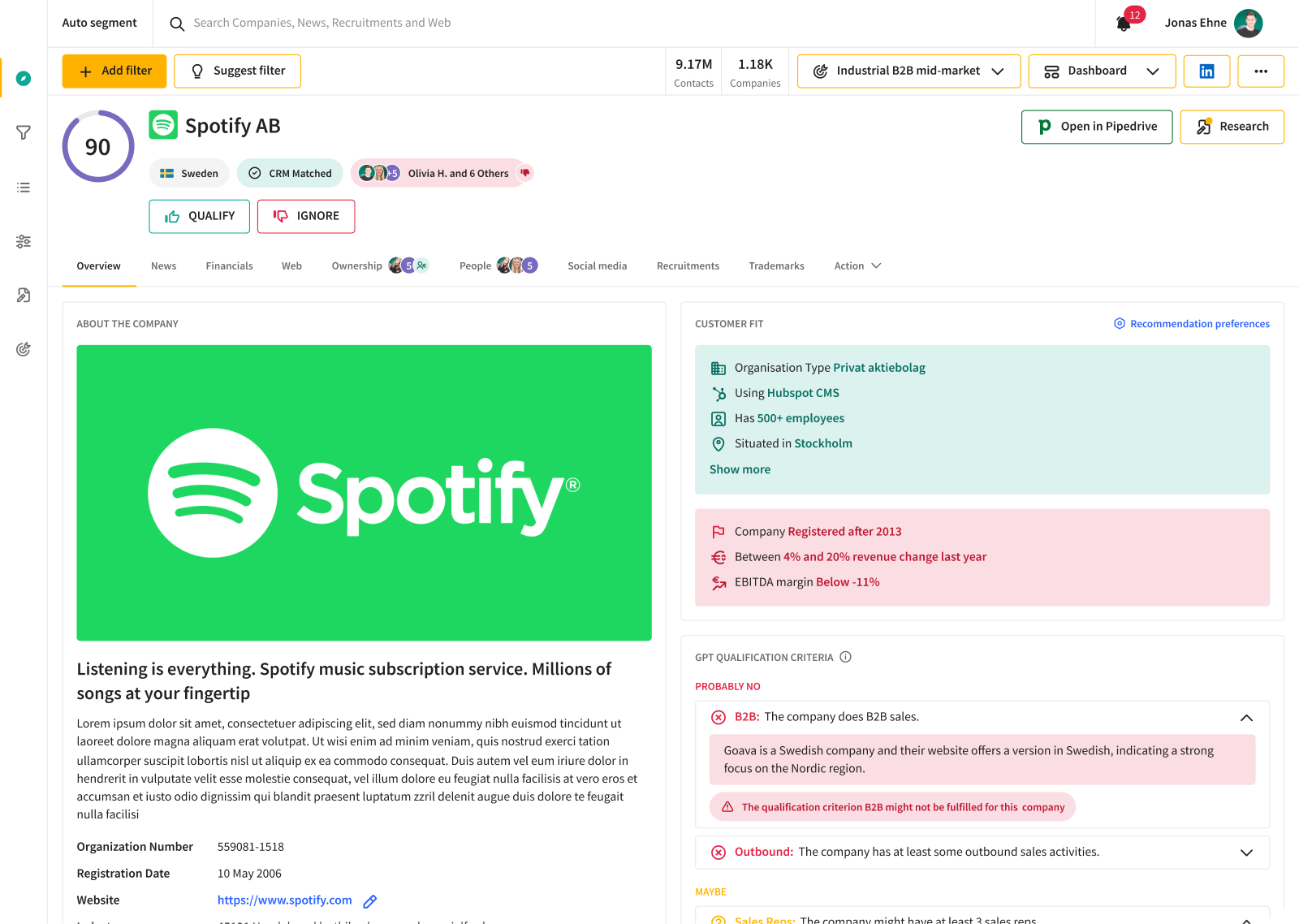
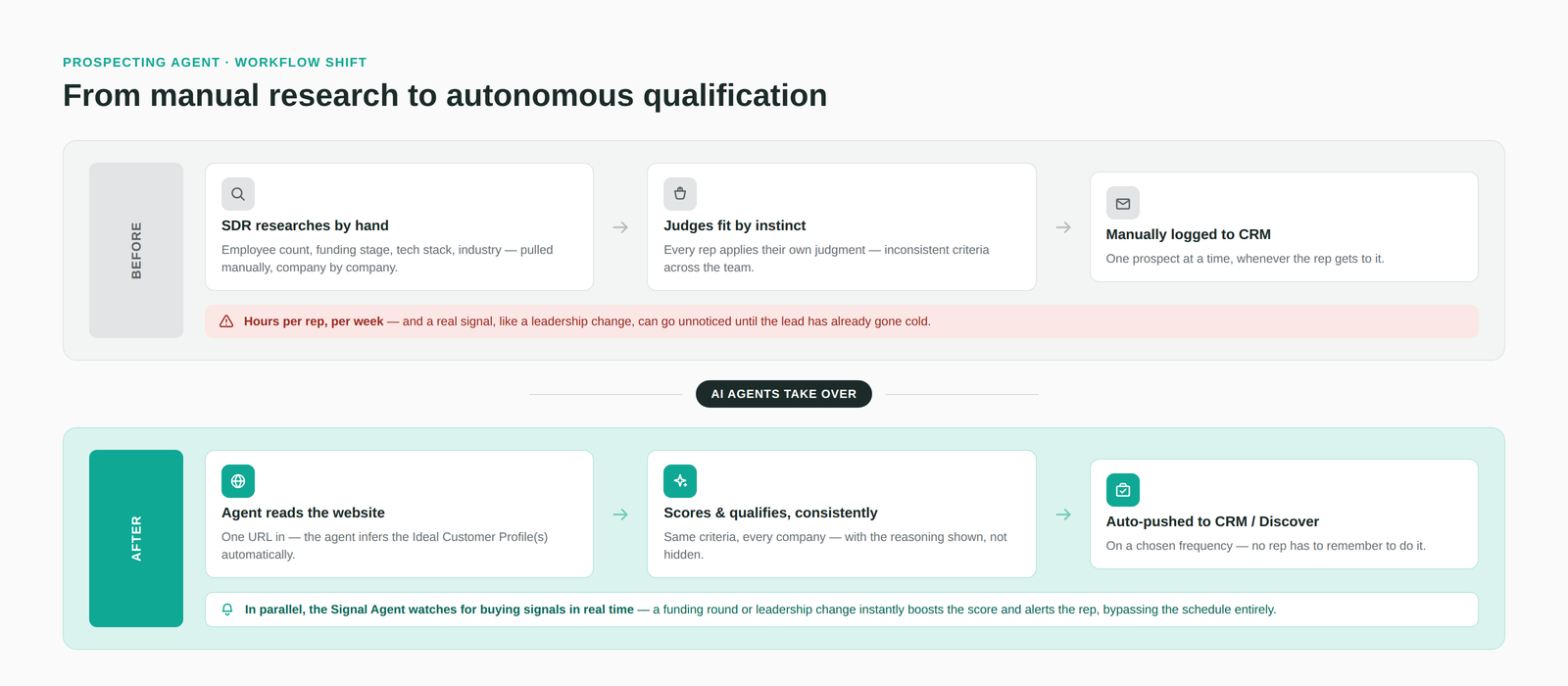
- The manual prospecting trap: Good prospecting meant an SDR manually researching a company, employee count, funding stage, tech stack, industry to judge fit. That process was slow (hours per week, per rep), inconsistent (different reps applied different judgment), and leaky: a real signal, like a leadership change, could go unnoticed and let a warm lead go cold.
- The signal problem: Even accounts already in the pipeline went stale. A company hiring aggressively, or replacing its CEO, is a strong buying signal, but nothing in the platform was watching for it in real time.
- The business risk: As AI-native tools entered the market, customers who couldn't justify the manual effort had an easy alternative. Discover needed to earn back the time it was costing.
“
The hardest part wasn't finding companies — it was manually applying filters and wading through an overwhelming amount of news just to find the signals that actually mattered.
— SDR, pilot cohort
My Role
End-to-end product design
Prospecting Agent (schedule-based and signal-based triggers), from research through launch
UX research
Interviewed SDRs and sales ops, reviewed existing usage data
Design system
Added agent-related components and patterns, utilized the existing design system
Systems design
AI credits system, two-way locking mechanism, sensible defaults
Cross-functional collaboration
Worked with engineering, sales, and data teams
Discovery and Research
The reality of sales signals
I looked at three things going in: where users were already spending time (and dropping off) in prospecting flows, how SDRs actually decided whether an account was worth pursuing, and what AI-native competitors were offering that Goava's customers were comparing against.
- Time is the enemy: SDRs spent disproportionate time on research that didn't lead to qualified leads. Automation really would help to keep retention and help the SDRs find the right things at the right moment.
- ICP isn't fixed: Companies didn't have one ideal customer profile. Different products, territories, and campaigns needed different targeting logic, so agents had to support multiple concurrent ICPs.
- Signals are missed even though it was there: The data for buying signals already existed inside the platform. The gap wasn't data, it was surfacing it at the right moment.
- Usage data revealed sensible defaults: Analyzing existing prospecting frequency patterns let us pre-fill agent settings with realistic defaults, cutting setup burden and cognitive load, as research suggested configuring the agents required too many parameters to set.
The Solution
Prospecting Agent
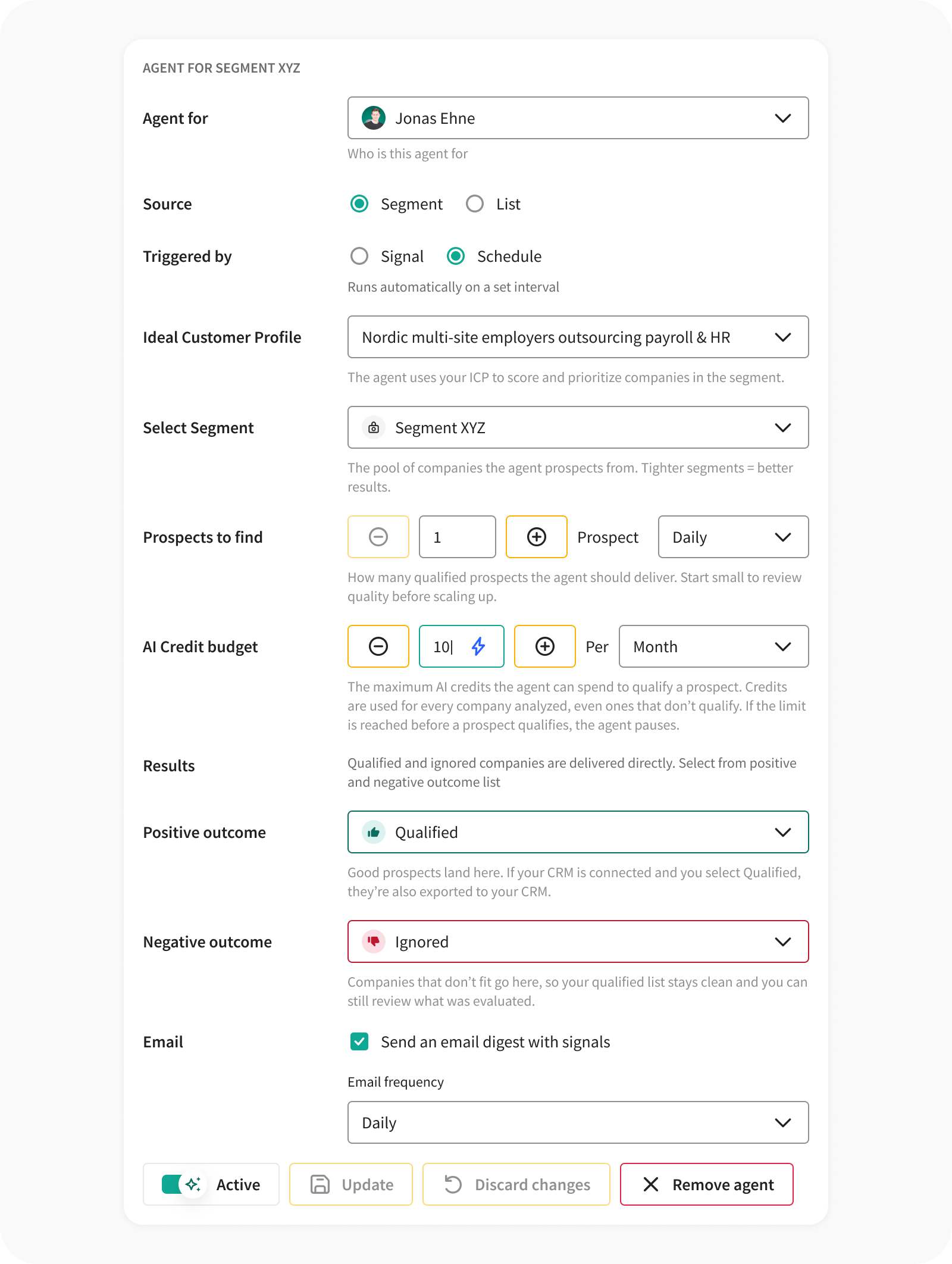
- Users set up an agent from Discover's agent settings, choosing an existing ICP profile to score against. A few of these are already generated by AI during onboarding, so most users start from one rather than building one from scratch.
- They select a segment, the pool of companies the agent evaluates. An auto-segment is already crafted during onboarding, and tighter, more relevant segments produce better results.
- The agent evaluates every company in that segment against the chosen ICP and sorts them by Goava Score.
- Qualifying companies land on a positive outcome list (auto-exported to the CRM if one's connected); rejected companies go to a negative outcome list, keeping the positive list clean.
- Users set an AI credit budget (a cap per prospect or per day/week/month), and the agent pauses automatically once it's spent.
- Multiple agents can run in parallel, each pointed at a different segment or ICP.
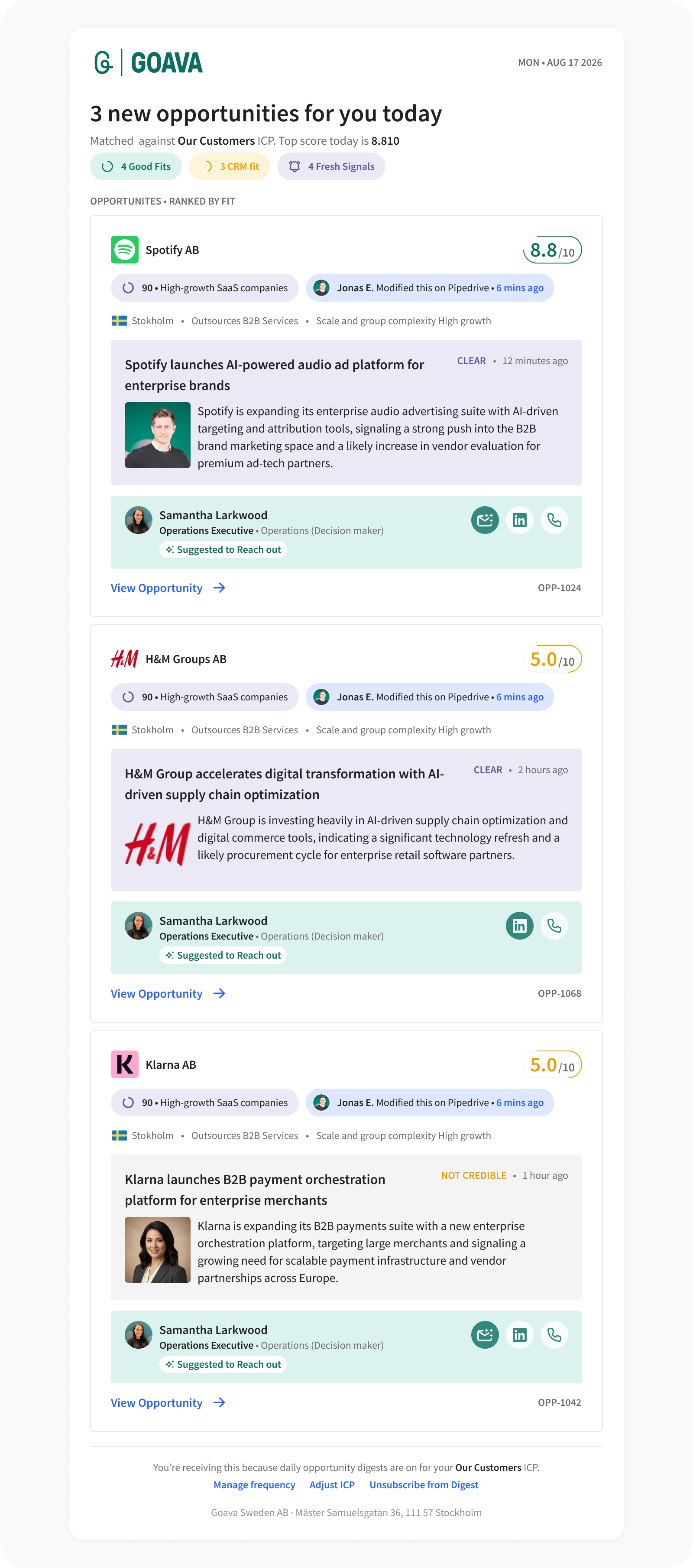
- If the user has opted in, a daily email digest summarizes the agent's qualified leads.
Two ways to trigger a run:
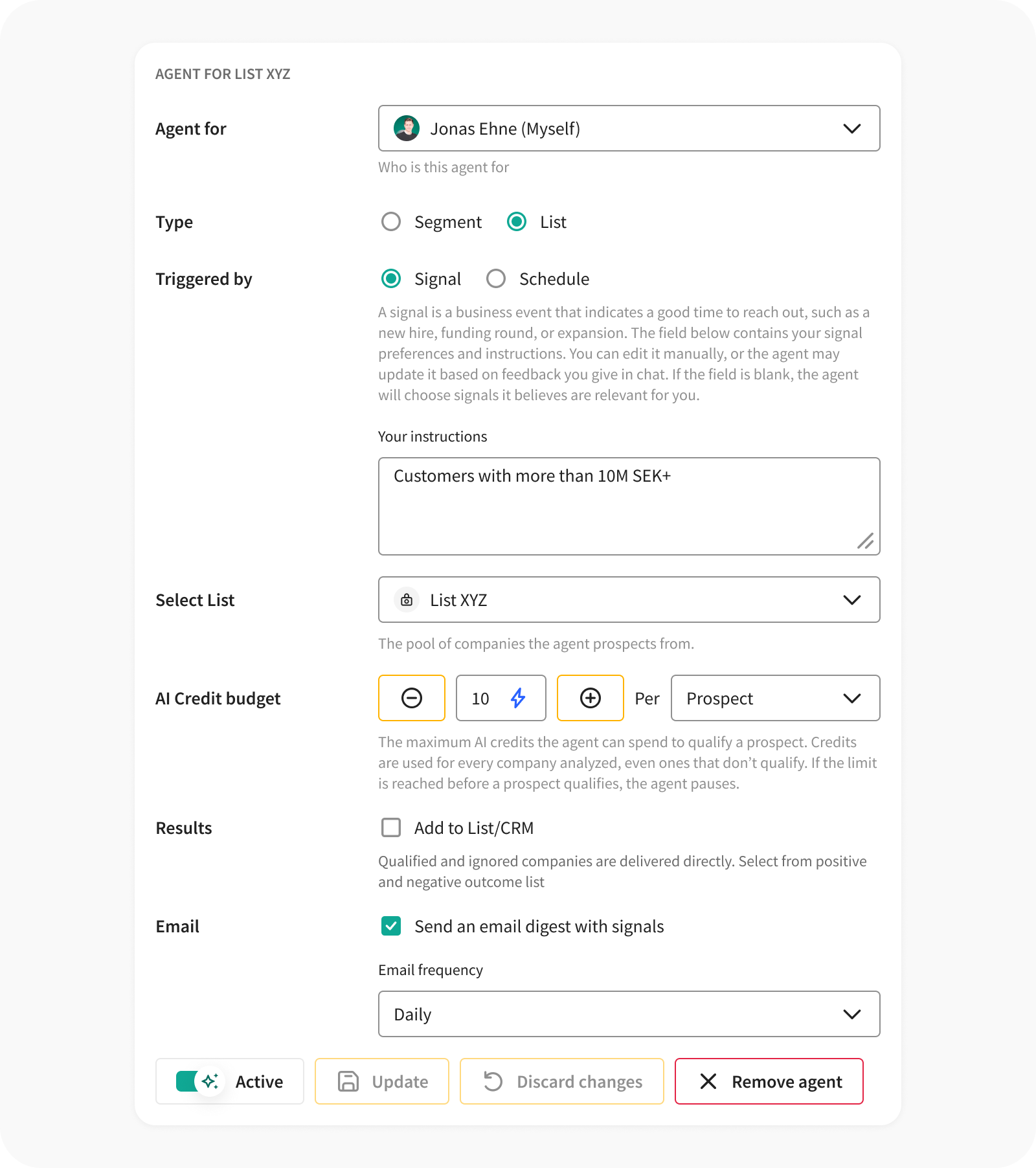
- Signal-based: Instead of a schedule, the agent continuously monitors news and hiring activity in the segment and evaluates companies the moment a relevant signal appears (a funding round, a leadership change, a hiring surge), using a default signal profile or one the user configures.
- Schedule-based: The agent runs every night against the segment, qualifying a set number of prospects per day or week.
Under the hood: Each company is evaluated by combining state-of-the-art LLMs with Goava's own data sources (including real-time news and event feeds) rather than scoring on static firmographic fields alone. That's what lets the agent reason about context (a funding round, a leadership change, a hiring surge) instead of just pattern-matching against a profile.
Getting the results: Qualified prospects show up in the configured Discover list and CRM. Paired with Research Agent Automations, prospects arrive with contacts and a research note already attached, turning a raw company name into something an SDR can act on immediately.
Key design decisions:
- ICP selection from existing profiles (AI-generated or user-described) rather than website-only inference: prioritizing precision over a flashier but less accurate shortcut.
- Segment as its own dial, so agents can be scoped tightly instead of scanning everything.
- Positive/negative outcome lists as the mechanism for keeping export quality high over time.
- Simplified agent settings: restricting trigger type (schedule vs. signal) to a single choice per agent.
The Design Challenge
Resource Gatekeeping
AI agents are resource-intensive, and a single misconfigured agent could exhaust a customer's entire AI credit allocation: surprise charges, confusion, eroded trust. The job was to give users control without burying them in configuration.
The solution: two-way locking, using AI credits as the shared currency.
Lock 1: Prospects per day or week. Under a schedule-based trigger, this sets how many companies the agent qualifies in each run, a throughput cap. It doesn't apply in signal-based mode, since the agent runs continuously and a fixed quota would contradict the point of an instant, real-time trigger.
Lock 2: AI credit budget. A spend cap set per prospect or per day/week/month; the agent pauses automatically once the budget is spent, so runaway spend isn't possible even at high volume.
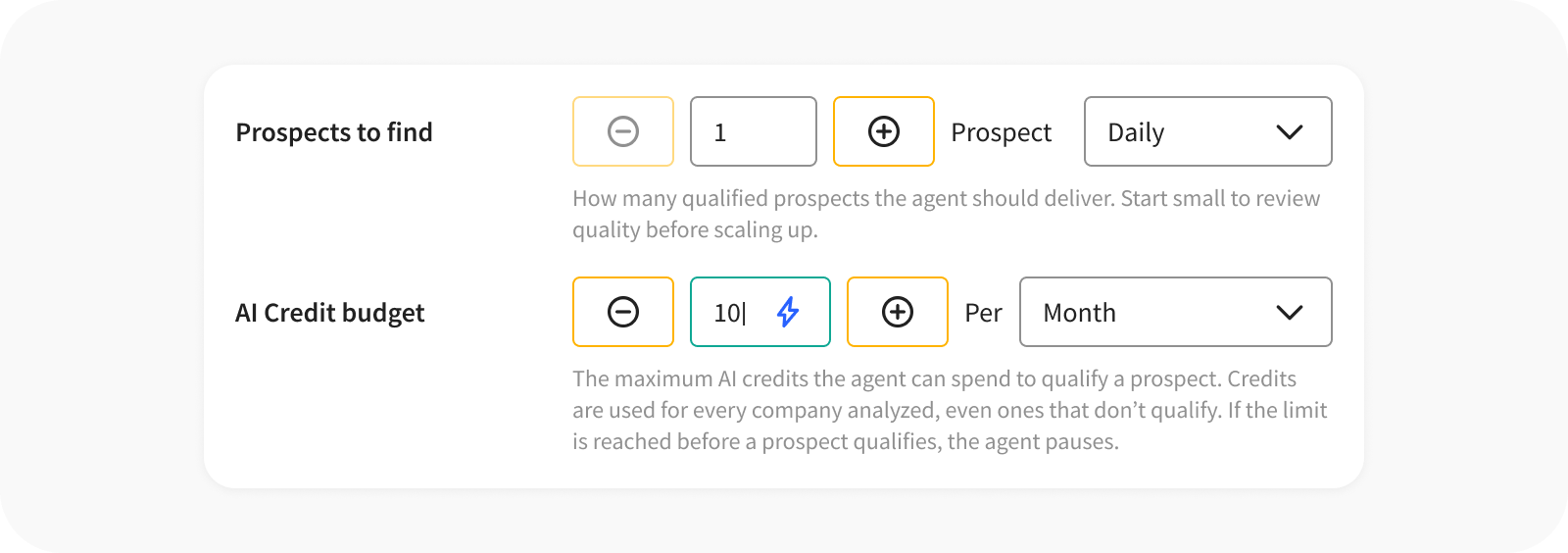
Sensible defaults, not a blank slate. Forcing users to configure everything from zero causes high friction. We analyzed past usage in Discover to provide grounded defaults. Users can adjust these later, but they start with a realistic baseline instead of a blank screen.
The simplification this unlocked. Because both locks already carry a sensible default, most users never need to touch the configuration at all. Turning an agent on is just flipping a switch right inside the dashboard. The defaults do the work that a setup form would otherwise demand.
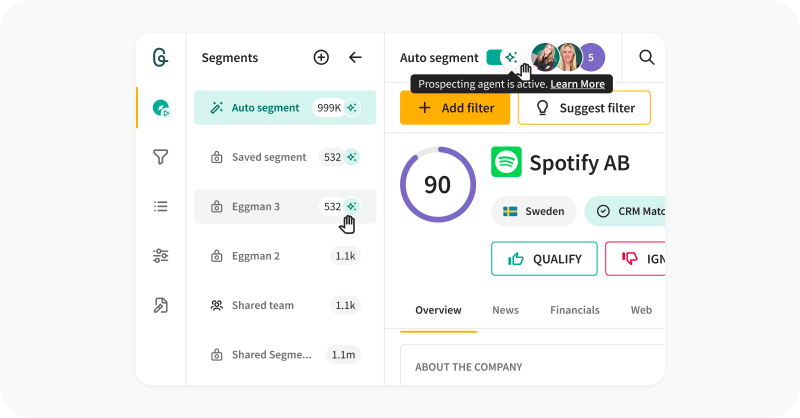
Why it mattered: for users, it removed the anxiety of open-ended AI cost; for Goava, it reduced support load from billing surprises; for the design, it meant building a mental model: AI credits as a spendable resource that users had never had to reason about before.
Outcomes & Impact
7× · 90% · 47 deals
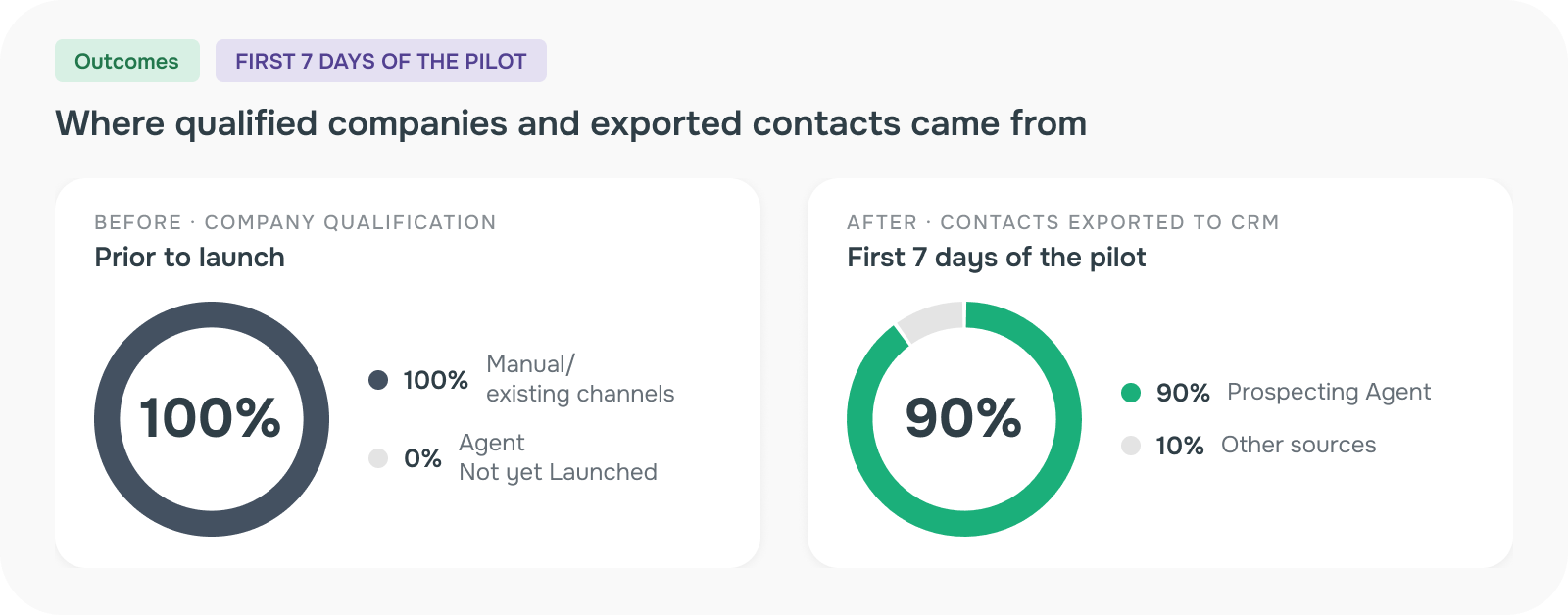
The Prospecting Agent launched as a limited pilot, and the results showed up immediately. Within the first 7 days, the agent accounted for 90% of all contacts exported to the CRM, and lifted total export volume by almost 7× without any additional SDR effort. More contacts exported means more pipeline, and the agent didn't just automate a task, it expanded what was possible without adding headcount.
On company qualification, the agent now drives 18% of all companies qualified in Discover, up from a fraction of that before launch. Post-launch analysis from the CEO shows the shift clearly: agent-sourced qualification went from a sliver of the total to the dominant source in a single week.
Momentum followed. Before a broader rollout was even announced, 12 companies had proactively reached out asking for access. Among pilot customers, Goava saw a 27% upsell rate, and the sales team began using the agent as a centerpiece of their pitch, helping generate 47 new deals.
Qualitative wins:
- The credit/locking system gave customers confidence that AI spend would never spiral, a real trust signal in enterprise procurement conversations.
- Signal alerts gave SDRs a concrete reason to act on, not just more data to sift through.
- Multiple-ICP support closed a long-standing gap for customers with diverse product lines or territories.
This reflects the first 7 days of a limited pilot. Longer-term retention effects will sharpen as the rollout expands over the next two quarters.
Reflection
What went well: Basing defaults on real usage data was one of the highest-leverage calls in the project. It cut setup time, reduced configuration errors, and forced an early, productive conversation with the data team.
What I'd do differently: The schedule-based vs. signal-based trigger split still asks users to learn two different mental models for the same agent. I explored unifying them into a single trigger model, but the two run on genuinely different mechanics under the hood: one on a timer, one on continuous monitoring, so collapsing them would have meant rebuilding both, at a cost that wasn't justified by the UX gain. The split stays, deliberately, as the right tradeoff for now rather than an oversight.
What I learned: Designing for AI systems means designing for failure states and cost in a way traditional product design rarely demands. Treating AI credits as a design constraint the same way you'd treat screen real estate was a new muscle, and one I'm glad I built. Designing for where AI actually is today. State-of-the-art LLMs are powerful but not fully deterministic, so reliability had to be treated as a design problem, not just an engineering one: consistent scoring, guarding against false or overconfident signals, and making it clear to the user when the agent was confident versus just plausible. That shaped as much of the interface as the workflow itself.
What's next: With the agent foundation in place, the natural next step is deeper coordination: multiple Prospecting Agents, each scoped to a different ICP or segment, informing each other's behavior in real time, and tighter integration with Research Agent Automations, so qualification and enrichment happen in a single motion.
See it in Action
Read the support article covering setup step by step, or check out the arcade to see how to configure a prospecting agent.